How to make a YouTube thumbnail for free
Your thumbnail and title decide whether anyone watches your video at all. A good thumbnail is not about fancy design; it is about being readable at the size of a postage stamp and making people curious. Here is how to make one in the editor you already used for your video, and the rules that make thumbnails work.
The right size
YouTube thumbnails should be 1280×720 pixels (16:9), as a JPG or PNG under 2 MB. The thumbnail maker's YouTube preset is exactly that size, and its JPG download is well under the limit. For vertical platforms, use 1080×1920: TikTok and Instagram let you choose a cover frame or upload a cover image for Reels. YouTube picks the Shorts thumbnail from a frame of the video in most cases, so for Shorts, put a strong frame with your title inside the video itself.
To upload a custom thumbnail on YouTube, your channel needs to be verified (a one-time phone verification in YouTube Studio).
Step by step
- Find your best frame. Scrub through your video for an expressive face, the result of the project, or the most dramatic moment. Pause on it.
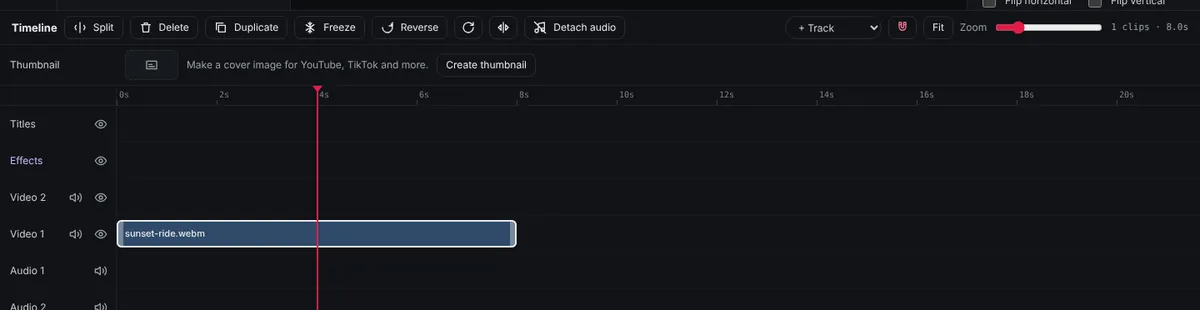
- Open the thumbnail maker. Click Create thumbnail in the Thumbnail row at the top of the timeline, then pick the size.
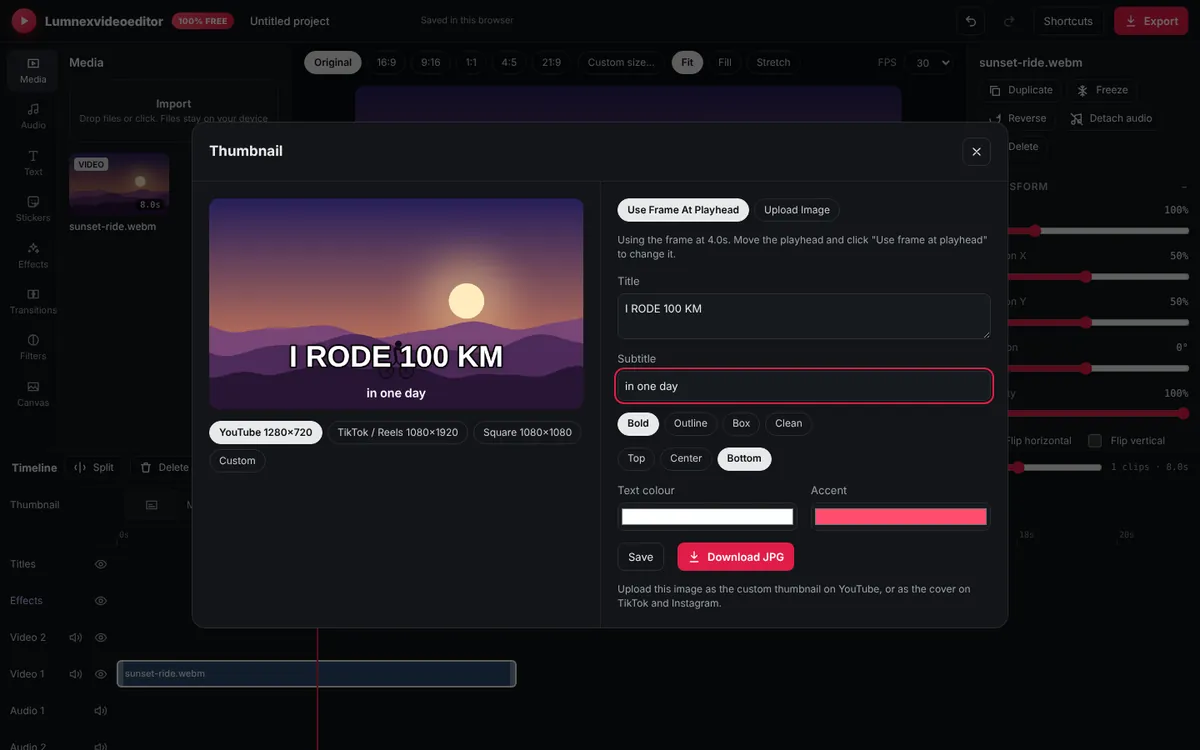
- Choose the picture. Click Use frame at playhead, or Upload image if you took a separate photo for the thumbnail (often sharper than a video frame).
- Write the title. Type 3–5 words in Title. Add a Subtitle only if it adds something.
- Style it. Choose a style and position, then set the Text colour and Accent colour. Keep the text away from the bottom-right corner, where YouTube shows the video length.
- Download. Click Download JPG, then upload it in YouTube Studio under Details → Thumbnail. Save keeps it inside your project so you can change it later.
Seven rules of thumbnails that get clicked
- Readable at small size. Most people see your thumbnail at about 170 pixels wide on a phone. Zoom out or step back from your screen: can you still read it in one second?
- Few words. Three to five big words beat a full sentence. The thumbnail should add to the title, not repeat it. Title: "I tried 5 free video editors"; thumbnail text: "ONLY ONE WORKED".
- One clear subject. One face or one object, large. Busy group shots and wide landscapes become unreadable when small.
- Faces with emotion. Surprise, excitement, concentration. Viewers are drawn to faces and read emotion instantly.
- High contrast. Bright subject on a darker background, or the other way round. Yellow, white and red text with a dark outline reads well on almost anything.
- Consistent style. Use the same font, colours and layout for a series so returning viewers recognise your videos at a glance.
- Honest. The thumbnail must match the video. Misleading thumbnails get clicks once, then viewers leave quickly, which tells YouTube to stop recommending the video. Misleading thumbnails can also break YouTube's policies.
Making the frame look better
Video frames are often slightly soft or dark. Before opening the thumbnail maker, you can improve the frame on the timeline: select the clip, raise Brightness, Contrast and Saturation a little in the Adjust section, or apply a vivid filter from the Filters tab. Because the thumbnail uses the frame as the editor shows it, those changes carry over. Undo them afterwards if you don't want them in the video. See how to colour grade a video.
Test and improve
YouTube Studio shows each video's impressions click-through rate: the share of people who saw the thumbnail and clicked. Compare it across your videos rather than against other channels, since it varies a lot by topic. If a video with good content has a low click-through rate after a few days, try a new thumbnail with a bigger subject or fewer words. YouTube also offers a built-in "Test & compare" feature on many channels, which shows different thumbnails to different viewers and picks the winner.
Thumbnails for other platforms
- TikTok: choose a cover when posting. A frame with a short text title helps people browsing your profile.
- Instagram Reels: upload a 1080×1920 cover, but keep the important part in the centre square, since your profile grid crops it.
- Facebook: you can choose a frame or upload a custom thumbnail for most videos.
Frequently asked questions
What size is a YouTube thumbnail?
1280×720 pixels (16:9), as a JPG, PNG or GIF under 2 MB. The thumbnail maker's YouTube preset uses exactly this size.
Can I make a YouTube thumbnail for free without a watermark?
Yes. The thumbnail maker in Lumnexvideoeditor is free and never adds a watermark.
Why can't I upload a custom thumbnail on YouTube?
YouTube requires channel verification, usually a one-time phone verification in YouTube Studio, before you can upload custom thumbnails.
Try it now
Lumnexvideoeditor is 100% free, needs no account and never adds a watermark. Your videos stay on your device.